
Plumbing Formulas in Excel: Which Ones Survive a Spreadsheet
- 06 Sep, 2026
Every estimator eventually builds the sheet. A tab for pipe sizing, a tab for the water heater comparison, a tab that works out whether the drain clears the footing. It is the right instinct — sizing math is iterative, and a spreadsheet is the only tool that lets you change one bore and watch six answers move.
The trouble is that plumbing math is not one kind of thing. Some of it is algebra, and algebra ports to a cell perfectly and stays correct forever. The rest is the International Plumbing Code, which is a book of tables, and a table pasted into a spreadsheet is a photograph of the code on the day you took it.
That distinction is the whole subject of this post, because it decides which parts of your sheet you can trust in three years and which parts you cannot.
The split, counted
Take the thirty-five formulas on our plumbing formula reference and sort them by what a spreadsheet actually needs.
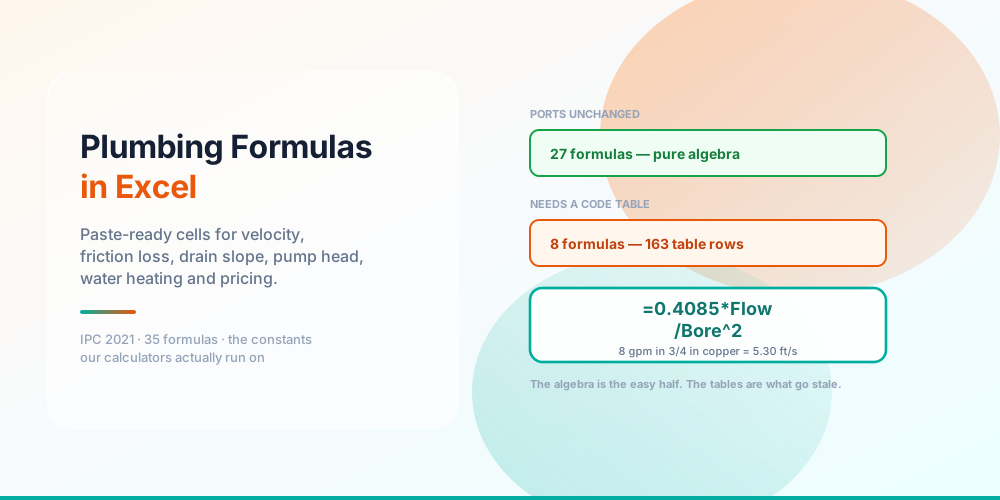
Twenty-seven port unchanged. Eight drag 163 rows of code table with them.
Twenty-seven of the thirty-five are pure algebra. Pipe velocity, Hazen-Williams friction loss, available pressure, Manning’s equation, total dynamic head, drawdown, recovery rate, tankless flow, first-hour rating, the mixing-valve ratio, storm runoff, pipe volume, the cost of a leak. Every one of those is a physical or arithmetic relationship. It does not have an edition. Paste it into a cell in 2026 and it will still be right in 2046.
Eight of them are code tables. Water supply fixture units to gpm demand, drainage fixture units and drain size, developed length with fitting equivalents, vent size, trap arm length, septic tank minimums, the water-density table behind thermal expansion, and the unit-conversion factors. Between them they carry 163 rows of data that has to live in your workbook, and every one of those rows can change in a code cycle without telling you.
That is not a failure of Excel. It is what the IPC is.
Build the sheet before you paste anything
The formulas on the reference page all assume the same trivial layout, so it is worth spending two minutes on it once.
Labels in A, values in B, answers in E — and name the constants
Inputs go in column B, constants go in their own block below them, and answers go in column E. Then select the block and use Formulas → Create from Selection → Left column. Excel turns every label in column A into a name for the value beside it, and your velocity formula stops reading =0.4085*B2/B3^2 and starts reading =K_VEL*Flow/Bore^2.
Two traps in that step. Excel will not let you name a cell C or R — they are reserved for R1C1 addressing — so the Hazen-Williams roughness coefficient, which every textbook calls C, has to be HW_C in a spreadsheet. And names cannot contain spaces or hyphens, so Dry Spell has to be DrySpell.
At 8 gpm through 3/4 inch Type L copper, that velocity cell returns 5.30 ft/s — comfortably under the 8 ft/s cold-water ceiling, and exactly what the calculator prints for the same two numbers.
Use the constants the calculator uses
Most published plumbing spreadsheets round their constants, and the rounding is where a sheet starts disagreeing with the tools around it.
The velocity constant is 0.4085, not 0.408. Head is 0.4331 psi per foot, not 0.433 — and the reciprocal is 2.3089, not 2.31, which matters once you feed it into a pump head total where four terms all get converted. The water-heating denominator is 499.8, which is 8.33 pounds per gallon times 60 minutes, not the 500 everyone writes.
None of those differences will change a pipe size. All of them will make your sheet disagree with a calculator in the second decimal, and then you will spend twenty minutes finding out why. Our Excel formula reference publishes each one at the precision the code actually runs on, because the whole point of the page is that a formula you paste returns the number the tool returns.
There is one honest exception worth knowing about. The cubic-feet-per-second to gpm factor in Manning’s equation is carried as 448.831 rather than the exact 448.8312, and the Excel page uses the rounded figure deliberately so that a sheet lands on precisely what the calculator prints. The difference is one part in a million.
The two ways a lookup lies
If your sheet is going to be wrong, this is where it will happen — and neither failure produces an error message.
A correct lookup, a confident number, and a failed inspection
The first is that the table is not the whole rule. A two-bath house is 18 drainage fixture units. Look that up in IPC Table 710.1(1) and you get a 2” building drain, which has a capacity of 21 DFU and comfortably fits. The lookup is correct. The answer is a violation, because a water closet floors a building drain at 3” no matter what the fixture-unit arithmetic says. In a spreadsheet that rule is a MAX(3, ...) wrapped around your lookup, and it is the single most commonly omitted line in every plumbing sheet on the internet.
The second is the third argument to MATCH. A 2-1/2” trap arm does not appear in Table 909.1 — the table lists exactly five sizes: 1-1/4”, 1-1/2”, 2”, 3”, 4”. An approximate match slides quietly down to the 2” row and hands you 8 ft. An exact match returns #N/A, which is the correct answer, because there is no such row. Use 0 for anything that is a listed size and 1 only when you are genuinely reading between anchors on a curve, like Hunter’s.
That second case generalises. In a plumbing table you almost never want “the row below” — you want the smallest pipe whose capacity clears your load, which is a first-TRUE search rather than a match. Get that backwards and every drain in the schedule comes out one size small.
What not to put in a spreadsheet
Two of the six table-driven formulas deserve more caution than the others.
Hunter’s curve converts fixture units to peak demand, and it is the least certain data in the whole subject. It lives in IPC Appendix E, which is enforceable only where a jurisdiction has specifically adopted it, and it was calibrated on fixtures far thirstier than anything sold today — so it reads high for modern low-flow fittings. That error runs toward larger pipe, which is the safe direction, but a number sitting in a spreadsheet cell has a way of shedding its caveats. If you paste that table, paste the caveat next to it.
Grease interceptor sizing by meal count is worse, not because the arithmetic is hard but because the local fats-oils-and-grease programme normally overrides it. On typical figures the minimum vessel governs below roughly 65 seats, so the calculation produces a confident number that the authority having jurisdiction then ignores. Read more in what size grease trap do I need.
Rounding: Excel agrees with us, JavaScript does not
A small thing that causes a surprising amount of confusion.
Excel’s ROUND rounds a half away from zero. So does the formatter our calculators display with. That means =ROUND(23.615,2) gives 23.62 in your sheet and 23.62 on our pages — they agree, and you can check one against the other digit for digit.
JavaScript’s toFixed does not: it rounds that same value to 23.61. If you have ever built a sheet from a competitor’s blog post and found it sitting one digit off, this is very often why. Round only for display, never in the middle of a chain.
Three habits worth keeping
Put every constant in its own named cell. A magic number buried in three formulas is a number you will never successfully update.
Label every pasted table with its source and edition — “IPC 2021 Table 909.1” in the cell above it. In two years that label is the only thing that will tell you whether the sheet is current.
Model your rates in the sheet; produce the quote somewhere else. A spreadsheet is the right place to work out what your bill rate has to be, or what a 25% markup really delivers as margin — that is analysis, and the Pricing & Business formulas are there for it. It is the wrong place to produce the document a customer signs, which needs line items, versions and a record of what was agreed. Model the money here and let the plumbing job estimate calculator and a real quote handle the rest.
Frequently asked questions
What is the Excel formula for water velocity in a pipe?
=0.4085*Flow/Bore^2, where Flow is gpm and Bore is the inside diameter in inches. Use the bore, not the nominal size — a nominal 3/4 inch is 0.785 in in Type L copper and 0.681 in in PEX, and the square term turns that into a third more velocity.
How do I write Hazen-Williams in Excel?
this, which returns psi per 100 ft:
=4.52*Flow^1.852*100/(HW_C^1.852*Bore^4.8704)The parentheses around the denominator are load-bearing; without them the diameter term multiplies instead of dividing. Name the roughness coefficient HW_C, because Excel reserves C.
Why can’t I name a cell C in Excel?
C and R are reserved for R1C1 reference style, along with their lowercase forms. Excel rejects them as defined names with a fairly unhelpful error. Any suffix fixes it — HW_C, C_factor, Cfac.
Does XLOOKUP work in my version of Excel?
XLOOKUP arrived in Microsoft 365 and Excel 2021. It is not in Excel 2019 or 2016. Every lookup on our Excel reference page also ships in INDEX/MATCH form, which works back to Excel 2007 and in Google Sheets and LibreOffice unchanged.
Can I use these formulas in Google Sheets?
Yes — the formulas are identical, XLOOKUP included. What differs is the setup, not the arithmetic: Sheets has no Formulas → Create from Selection, so named ranges go in one at a time under Data → Named ranges. And in a locale that uses a comma as the decimal separator, the argument separator becomes a semicolon and the comma inside { } array literals becomes a backslash. The bigger point is what you would build instead once you are in Sheets — plumbing formulas in Google Sheets covers one ARRAYFORMULA sizing a whole fixture schedule, QUERY in place of a pivot table, and named functions that collapse the Hunter’s-curve monster to =WSFU_TO_GPM(B2).
Will a spreadsheet answer match your calculators?
It will if you use the constants at the precision we publish them. Every formula on the Excel formula reference is checked against the same code that runs the calculators, using the same worked inputs, so the two agree.
Which plumbing formulas can’t go in a spreadsheet?
All thirty-five can, arithmetically. Eight need a code table pasted alongside them, and two of those — Hunter’s curve and grease sizing by meal count — carry caveats that a bare number in a cell will not remember for you.
Should I download a plumbing calculation spreadsheet instead?
A downloaded workbook has one flaw that a formula does not: it cannot tell you when it went out of date. If you build the sheet yourself from formulas you understand, you know exactly which cells depend on a code table and which are physics. That is why we publish formulas and tables rather than a file.
How do I size a water line in Excel?
Three cells, worked together: velocity, Hazen-Williams loss, and the allowable loss from your pressure budget. Pick the smallest bore that passes both the velocity ceiling and the friction budget. The long version is in what size water line do I need.
Sources & standards: International Plumbing Code (IPC) 2021 — 604.1, Table 604.3, 604.8, 607.3, 704.1, Table 709.1, Tables 710.1(1) and 710.1(2), 906.2, Table 909.1, 916.2, and Appendix E Tables E103.3(2) and E103.3(3). Grease interceptor ratings follow PDI-G101. Every figure in this post is computed from the same library that runs our calculators rather than transcribed. Velocity limits, fitting equivalent lengths, and the Hazen-Williams and Manning coefficients are ASPE and manufacturer design practice, not code requirements, and Appendix E is an appendix — enforceable only where a jurisdiction has adopted it. Plumbing code adoption is split between the IPC and the Uniform Plumbing Code, which differ on fixture-unit tables and slope allowances, so confirm which code and which edition your jurisdiction enforces. Local amendments override the model code, and a licensed plumber plus the AHJ have final say on anything installed. Microsoft Excel function availability is per Microsoft’s published documentation for Microsoft 365, Excel 2021 and earlier perpetual releases.